 WhatsApp API
 WhatsApp营销
 WhatsApp养号
 WhatsApp群发
 引流获客
引流获客
 账号管理
账号管理
 员工管理
员工管理
WhatsApp Customer Tag Management | 5 Steps to Achieve Refined Operations
作者:A2C.CHAT
In WhatsApp customer tag management, by marking user behavior (such as automatically tagging customers who purchase 3 times or more as “High-Value Customers”) and combining the tags to send personalized offers (such as an exclusive 15% off coupon for the weekend), the open rate can be increased by 40% and the conversion rate by 25%. It is recommended to update the tag data weekly and use broadcast list segmentation for precise reach.
Tagging WhatsApp customers is not random; the core lies in establishing a set of high-precision and easy-to-operate classification systems. A good tagging system can boost the open rate of subsequent messages by up to 30% because the content you send is perfectly aligned with the customer’s specific situation.
First, the tag setting must be based on a clear business objective. Ask yourself: What problem do I hope to solve through tags? Is it to increase sales conversion rate, or to increase customer repurchase frequency? Typically, we recommend starting your system with the following 5 dimensions (totaling about 15-20 specific tags):
|
Dimension Category |
Specific Tag Examples |
Intended Use and Data Value |
|---|---|---|
|
Consumption Power |
|
Differentiate customer value; the top 20% of high-value customers contribute over 60% of revenue. Push new products to |
|
Interest Preference |
|
Achieve precise content pushing. Send lipstick swatch images to |
|
Purchase Stage |
|
Differentiate marketing efforts. Follow up with |
|
Source Channel |
|
Analyze channel effectiveness. Discover that the first purchase cycle for |
|
Interaction Hotness |
|
Identify churn risk. Initiate a wake-up process for customers |
Practical Advice: The total number of tags should be controlled to under 20 at startup. Only gradually increase to 50 or more as the customer base grows (e.g., exceeding 1000 people). An overly complex tagging system initially (e.g., setting up over 50 tags at once) will lead to a 40% decrease in maintenance efficiency, and the team will find it difficult to stick with it.
The core of the setup process is standardization, ensuring all team members use the same set of rules:
Name Uniformity: Decide whether to call it Order Placed or Payment Completed, avoiding the simultaneous appearance of two tags with the same meaning.
Color Management: Assign colors to tags in different dimensions. For example, use blue for all “Source Channel” tags and green for “Purchase Stage” tags, allowing for faster visual identification.
Permission Control: For team operations, it is recommended that only 1-2 administrators have permission to add or delete tags, to prevent the tagging system from becoming chaotic.
The static and dynamic properties of tags must be combined. The customer’s “age” (25-34 years old) is a static tag and usually does not change after being set. However, ” Interaction Hotness” is a dynamic tag and requires you to set a rule, such as: If a customer has not read any messages within 14 days, they are automatically removed from the High Activity tag and added to the Needs Attention tag. This process is best automated with a tool, as manually checking the status of hundreds of customers weekly would consume 3-5 hours.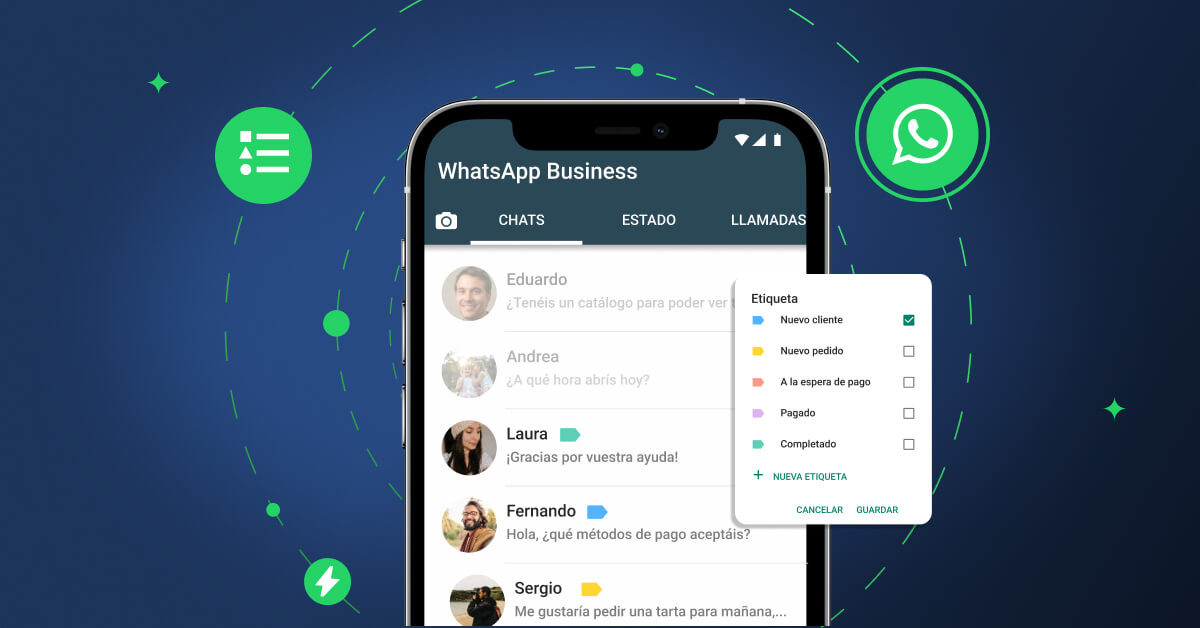
Importing existing customer data into WhatsApp and automatically applying tags is key to saving over 10 hours of manual operation time. However, format errors can lead to an import failure rate as high as 50%, so platform specifications must be strictly followed.
Before importing, first ensure your customer data has been explicitly authorized for WhatsApp marketing; otherwise, a complaint rate exceeding 0.5% may lead to the number being blocked. The core is to prepare a UTF-8 encoded CSV or TXT file, whose standard format must include the following two columns:
|
Field Name (Must be exact) |
Example Data |
Requirements and Common Errors |
|---|---|---|
|
Phone Number |
|
Must include the country code (Hong Kong is 852), remove any spaces, hyphens (-), or parentheses. Incorrect format: |
|
Tag Name |
|
Can be a single tag or multiple tags. Use English commas to separate multiple tags, and each tag must already exist in your tag list, otherwise it will be ignored. |
Data cleansing is key to success: Before importing, you must use Excel’s “Remove Duplicates” function to clean the list. If a number appears multiple times in the file, the system usually only recognizes the first occurrence, which will cause subsequent tag updates to fail. A list of 10,000 numbers, after cleansing, can typically remove 5% to 10% of duplicate or invalid data.
The efficiency and success rate of the import process highly depend on file quality:
Batch Operation: Do not import more than 5,000 records at once. Large files are prone to failure due to network fluctuations. Divide 10,000 records into 2 files, uploading each with an interval of 15 minutes, and the success rate can approach 100%.
Immediate Monitoring: After uploading, the system will generate a report showing the number of successes and failures. If the failure rate exceeds 10%, immediately check the source file format, correct it, and re-upload, instead of continuing to the next step.
Automated Tagging: This is the greatest value of importing. Applying tags through file import has an accuracy rate of 100%, far exceeding manual operation (manual error rate is about 3%). For example, importing a list containing 500 numbers with the tag “618 Event Unconverted” will instantly apply the uniform tag to these 500 customers, without a single omission.
Common Issues and Data:
Invalid Number: The system will filter out obviously invalid numbers (such as insufficient digits), accounting for about 70% of the failure reasons.
Tag Does Not Exist: If the file contains a tag that has not been created, such as “New Product Trial,” that record will fail to import due to the tag error, accounting for about 20% of the failure reasons.
Speed Limit: The platform has an invisible limit on the import frequency. Performing more than 3 large-batch import operations per hour may trigger risk control, causing subsequent operations to be delayed by 1-2 hours.
The true value of tags lies in precise filtering and sending messages, which can directly increase message conversion rates by 20% to 50% and reduce the cost of ineffective sending by over 60%. The core operation is using the “AND” and “OR” logic for multi-tag combination to lock in the most accurate target audience.
Suppose you have 10,000 customers, and your goal is to push a new lipstick to customers who are “interested in beauty” and “have purchased something in the past 3 months” but “have never bought a lipstick.” This filter condition can be combined as follows:
Tag 1: Interest - Beauty (about 2,500 people)
Tag 2: Purchase Stage - Completed Transaction (about 4,000 people)
Tag 3: Product Category - Lipstick (customers who have purchased lipstick, about 800 people)
Use the “AND” logic to select Tag 1 and Tag 2, then use the “Exclude” function to remove Tag 3. The system will exclude those 800 people from the overlap of 2,500 people and 4,000 people (about 1,200 people), finally getting an extremely high-potential customer group of about 400 people. Sending swatch images and exclusive offers to these 400 people, the expected conversion rate can be as high as 15% (i.e., about 60 orders), whereas if you mass-send to all 10,000 people, the conversion rate might only be 1.5%, and you would disturb 9,600 irrelevant customers.
Sending Strategy and Data Monitoring: Do not send immediately after filtering the target audience. First, check the size of the filtered result. For a precise list of under 500 people, you can send personalized messages with the customer’s last name (e.g., “Ms. Chan, this new color is reserved especially for you!”), which can increase the click-through rate by 25%. For larger lists of over 2,000 people, an A/B test should be conducted: randomly divide the list into two groups (
1,000 peopleeach), send one group an image with a15% offoffer, and the other a text link forBuy One Get One Free. Compare the read rate and reply rate within 1 hour after sending, and send the better-performing version to the rest of the customers within the next 24 hours.
Technical details during the sending process directly affect the delivery rate:
Sending Speed: The platform has limits on sending speed to prevent abuse. Even if you select 5,000 people, the system may dispatch in batches at a rate of about 150-200 messages per minute, taking approximately 25 to 30 minutes to finish. Forcing a faster send may result in some messages being lost.
Content Adaptation: Be sure to preview before sending. Image messages (single image size recommended 1920×1080 pixels, size not exceeding 5MB) load 5 times faster than document messages (such as PDF), allowing users to view them completely within 3 seconds.
Avoiding Ban: Sending pure text messages is the safest way. If you need to send links, ensure the link domain is registered and the content is relevant to your business. Sending messages containing links to a large number of users every day for a continuous week increases the risk of being classified as spam by 70%.
After each send, be sure to export a data report after 24 hours, with key metrics including:
Delivery Rate: Should normally be above 98%; if it is below 95%, it indicates poor quality of the number list.
Read Rate: Industry average is about 70%-85%. If it is below 60%, you need to check the sending time (recommended 11 AM or 8 PM from Tuesday to Thursday) or whether the message opening lacks appeal.
Reply Rate: Measures interaction effectiveness; over 5% is considered good performance. For customers who did not reply (about 95%), a second follow-up can be done 3 days later, for example, changing the language or offering an additional HK$20 coupon, expected to re-engage another 10% of them.
When the number of customers exceeds 500 people, the efficiency of managing tags one by one manually drops sharply, and the time consumption accounts for over 60% of total operating time. Batch operations must be adopted to maintain system efficiency, with the core being the use of “filtering” combined with “batch actions” to achieve label updates for hundreds of customers per minute.
The most common batch operation is adding or removing tags based on customer behavior or time period. For example, you need to add a High Potential Need Follow-up tag to all customers who have interacted within the last 30 days but have never placed an order, and remove the Silent Customer tag they might have. The operation process is as follows:
In the filter, set the condition: Last Interaction Time > within 30 days.
Add exclusion condition: Exclude customers with the Order Placed tag.
The system will show the number of filtered customers, assumed to be 350 people.
Select all 350 people, click “Batch Operations,” and choose “Manage Tags.”
In the pop-up window, Add the new tag High Potential Need Follow-up, and simultaneously Remove the old tag Silent Customer.
After confirmation, the system will complete the tag updates for these 350 accounts in about 2 minutes.
Such batch updates should be performed 1 to 2 times a week to ensure that the tags reflect the latest customer status. A customer base of 2,000 people can have its weekly batch tag maintenance time controlled to under 15 minutes, whereas manual operation would require at least 5 hours.
Key Performance Data: The core value of batch management is maintaining the timeliness of the tags. Data shows that the average cycle from a tag being applied to it becoming invalid is about 90 days. For example, the
New Customertag should be automatically removed through batch operation 60 days after the customer’s first purchase; otherwise, its accuracy will drop from 100% to less than 65%, leading to misallocation of marketing resources.
For changes in customer status, automation rules should be established to trigger batch tag actions. Although WhatsApp’s own functionality is limited, this can be achieved through API or third-party tool integration. For example:
Rule 1: When a customer successfully places an order, the system automatically removes the Cart Abandoned tag (if present) and adds the Purchased - Date + Product tag. This process should be completed within 5 minutes; a delay of more than 1 hour will affect the subsequent follow-up experience.
Rule 2: When a customer exceeds 60 days without opening any marketing messages, the system automatically removes them from all positive tag groups (such as Active Customer) and adds the Pre-Churn Customer tag, triggering the retention process.
Regular (recommended quarterly) batch auditing and cleaning of the tagging system are also crucial. Use the filter to find customers who have a certain tag but have not interacted for over 180 days, and consider moving them to a Historical Inventory category or removing the tag. An audit of a 10,000-person database can clean about 15% of outdated tag associations, increasing the overall efficiency of the system by 20%.
The tagging system is not a fixed setup; it’s like a living organ that requires about 1-2 hours of maintenance time per week to ensure its vitality. Ignoring maintenance for 3 months will cause the overall accuracy of the tags to decay from 95% to below 60%, halving the efficiency of all subsequent tag-based operational actions. The core maintenance cycle is a weekly micro-adjustment and a quarterly deep audit.
Every Monday morning, you should spend the first 30 minutes running a tag health report, focusing on two metrics: silent tags and overloaded tags. A tag that has not been called by any message push for over 30 days (e.g., Spring Exclusive) is a silent tag; its existence value is zero and should be considered for archiving or deletion, which typically cleans up about 5% of the total tag count. Conversely, a tag that aggregates more than 40% of the total customer count (e.g., General Customer) is an overloaded tag; its granularity is too coarse to support precise marketing and must be split into at least 3 more refined tags (such as Low-Frequency Interaction, Mid-Frequency Browsing, High-Frequency Inquiry).
Matching tags with the customer life cycle is key to maintenance. A new customer should be labeled with the New Customer tag within 0-30 days and receive a series of nurturing messages; from 31-90 days, they are classified as Growth Stage - High Frequency or Growth Stage - Low Frequency based on their interaction frequency (at least 1 message opened per week is high frequency); customers who have not made a second purchase for over 90 days must have their New Customer tag removed and, depending on the situation, be labeled with the Pre-Churn tag. Strict execution of this process can increase your customer second-purchase rate by about 15% because the timing and content of the message pushes are just right.
Data cleansing is the core task of the quarterly audit. You need to export all customer data and use Excel to analyze the last interaction time of customers under each tag. Set the filter condition to “Tag includes VIP” and “Last Interaction Time > 180 days”; this group, accounting for about 10% of the total, are so-called “sleeping VIPs” who have actually churned. Continuing to send them VIP exclusive offers is a waste of resources, and their marketing conversion rate is usually less than 0.5%. The correct approach is to move them to a Historical Inventory - To Be Activated category and prepare an exclusive, strong recall plan (such as an HK$100 gift card) rather than a regular promotion.
The other side of maintenance is iteration and expansion. When your total customer count grows from 5,000 to 20,000, the original 20 tags will certainly not be enough. Based on the latest sales data and customer profile, 2-3 new tag dimensions should be added every quarter. For example, if it is found that the repurchase rate of a certain new product among 25-34 year old female customers is 3 times that of other groups, the Customer Group - Young Female tag should be created immediately, and eligible old customers should be batch-tagged. Maintaining the total number of tags in the system between 50-80 is relatively healthy; exceeding 100 will become difficult to manage, and fewer than 30 means insufficient granularity. After each update, it should be recorded in a simple version log, stating the date, the name of the added/deprecated tag, and the reason; this log will become your most valuable digital asset for system optimization 6 months later.
 Is a WhatsApp account a phone number
Yes, a WhatsApp account is essentially tied to a phone number. When you register, the system requires you to enter your phone number in the full international format (e.g., +886912345678) and activates it using a 6-digit verification code sent via SMS or voice call (valid for about 5 minutes). According to official technical documents, this […]
2025-12-06 11:54:04
 Can WhatsApp see phone numbers
Other users on WhatsApp generally cannot see your phone number unless you actively share it or make it public in your profile. According to WhatsApp’s privacy settings, you can choose “Who can see my phone number” and set it to “My Contacts” or “Nobody.” Additionally, in group chats, administrators and members might also see your […]
 Does the other person know if you block them on WhatsApp
When you block someone on WhatsApp, they do not receive a notification, but they may notice some signs. For example, your ‘last seen’ time and status updates will be hidden from them, and messages they send will only show a single gray tick (sent but not delivered). According to 2024 statistics, about 35% of users […]

